BlackSharing: image

WELCOME!

PASSWORD IF NEED: blacksharing

Cari di sini

Tampilkan postingan dengan label image. Tampilkan semua postingan

Sabtu, 28 Januari 2012


 BenVista PhotoZoom Pro 4, and get superb results through our unique, award-winning S-Spline technology! Equipped with S-Spline Max, the latest generation of BenVista's patented S-Spline algorithm, PhotoZoom Pro 4 creates image enlargements of unequalled quality. PhotoZoom Pro 4 beats any of the alternative solutions, such as Photoshop's Bicubic technique, fractal-based methods, and so-called 'industry standards'. Where competitors fail to get past 300000 by 300000 pixels, PhotoZoom Pro 4 enlarges images up to 1 million by 1 million pixels. PhotoZoom Pro 4 is the ideal solution for enlarging digital images, both for printing and on-screen purposes. Besides enlargements of unequalled quality it offers various professional functions and features, and can be easily fit into anyone's workflow. PhotoZoom Pro 4 is an absolute must-have for both professionals and serious amateurs who want to resize their images.

Features:
- The latest S-Spline interpolation algorithms
- Higher quality image enlargements & higher quality downsizing
- Advanced fine-tuning tools: create your own presets & save them for later
- Reduction of (JPEG) compression artifacts and noise
- Batch processing
- Multi-processor support
- Works as stand-alone application, as well as Automation plug-in and Export plug-in for Photoshop
- Extreme enlargements: up to 1 million by 1 million pixels!
- Extensive support for high-end images

 DOWNLOAD
Read More..

Senin, 16 Mei 2011

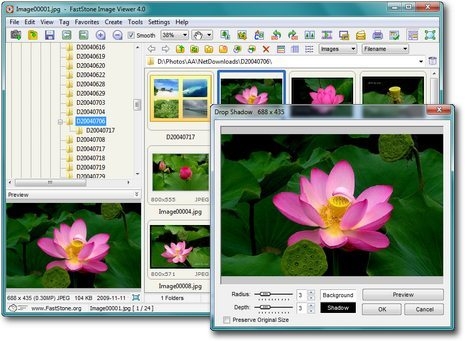
Fastone image viewer 4.5 corporate full + Key

waw... now for Your pictures will look more attractive and tangible. fastone provide free and paid options bit now i share the paid but free for you.

FastStone Image Viewer is a fast, stable, user-friendly image browser, converter and editor. It has a nice array of features that include image viewing, management, comparison, red-eye removal, emailing, resizing, cropping and color adjustments. Its innovative but intuitive full-screen mode provides quick access to EXIF information, thumbnail browser and major functionalities via hidden toolbars that pop up when your mouse touches the four edges of the screen. Other features include a high quality magnifier and a musical slideshow with 150+ transitional effects, as well as lossless JPEG transitions, drop shadow effects, image annotation, scanner support, histogram and much more. It supports all major graphic formats (BMP, JPEG, JPEG 2000, animated GIF, PNG, PCX, TIFF, WMF, ICO and TGA) and popular digital camera RAW formats (CRW, CR2, NEF, PEF, RAF, MRW, ORF, SRF and DNG).


Features:

• Image browser and viewer with a familiar Windows Explorer-like user interface
• Support of many popular image formats: BMP, JPEG, JPEG 2000, animated GIF, PNG, PCX, TIFF, WMF, ICO and TGA and popular digital camera RAW formats (CRW, CR2, NEF, PEF, RAF, MRW, ORF, SRF and DNG).
• True Full Screen viewer with image zoom support and unique fly-out menu panels
• Crystal-clear and customizable one-click image magnifier
• Superior Red-Eye effect removal/reduction with completely natural looking end result
• Image modification tools: Resize/resample, rotate/flip, crop, sharpen/blur, brightness/contrast, etc.
• Eleven (yes, 11) resampling algorithms to choose from when resizing images
• Image color effects: gray scale, sepia, negative, Red/Green/Blue adjustment
• Image special effects: watermark, annotation, drop shadow, framing, bump map, lens, morph, waves
• Multi-level Undo/Redo capability
• One-touch best fit/actual size image display support
• Image management, including tagging capability, with drag-and-drop and Copy To/Move To Folder support
• Histogram display with color counter feature
• Compare images side-by-side (up to 4 at a time) to easily cull those forgettable shots
• Image EXIF metadata support (plus comment editing for JPEGs)
• Configurable batch processing to convert/rename large or small collections of images
• Slideshow creation with 150+ transition effects and music support (MP3, WMA, WAV...)
• Create efficient image attachment(s) for emailing to family and friends
Print images with full page-layout control
• Create fully configurable Contact Sheets - just like the pros (and save $$$ on ink)
• Create memorable artistic image montages from your family photos for personalized desktop wallpapers (Wallpaper Anywhere)
• Acquire images from a scanner
• Versatile screen capture capability
• Powerful Save As interface to compare image quality and control generated file size
• Run favorite programs with one keystroke from within Image Viewer
• Create a no-install fully portable version of the program which can be run from a removable storage device
• Configurable mouse wheel support
• Supports multiple program skins
• Supports dual-monitor configurations
• And much more...


DOWNLOAD

Read More..

Senin, 02 Mei 2011

Fastone Capture Full

FastStone Capture adalah software penangkap secren shoot yang bagus, ringan, gambar yang diambil penuh dengan fitur yang memungkinkan Anda untuk dengan mudah menangkap dan keterangan apapun di layar termasuk jendela, objek, menu, layar penuh, empat persegi panjang / wilayah freehand dan bahkan windows bergulir / halaman web. Anda dapat dengan mudah untuk mengirim secreenshoot ke editor, file, clipboard, printer, email, dokumen Word / PowerPoint atau upload ke website Anda. Pengeditan mencakup annotating (teks, garis arrowed, menyoroti), mengubah ukuran, cropping, sharpening, watermarking, menerapkan efek tepi dan banyak lagi. Hal ini juga memungkinkan Anda untuk merekam kegiatan layar dan suara ke dalam file video sangat padat. Fitur lain termasuk hotkeys global, otomatis nama file generasi, dukungan untuk editor eksternal, color picker, sebuah kaca pembesar layar dan penguasa layar.
FastStone Capture menyimpan file dalam BMP, GIF, JPEG, PCX, PNG, TGA, TIFF dan format PDF.

       SETUP
 DOWNLOAD!!!
         KEY
DOWNLOAD!!
Read More..