BlackSharing: internet

WELCOME!

PASSWORD IF NEED: blacksharing

Cari di sini

Tampilkan postingan dengan label internet. Tampilkan semua postingan

Jumat, 22 Mei 2015

Internet Download Manger 6.23 build 12 Full Crack

How to Crack any IDM Version ?
  1. Install the latest version of IDM / Or update via quick update (yes its possible now)
  2. Turn off any virus guards
  3. Download and Run IDM Universal Web Crack.exe
  4. Update IDM Universal Web Crack (if it asks)
  5. Select IDM Installation path
  6. Click Crack button and wait till it say IDM activated successfully ! (Press the button twice to make sure it worked)
  7. Now open IDM and enjoy lifetime full version license
How to Update / When a new version of IDM comes
Update IDM via IDM’s quick update.Then  run the IDM Universal Web Crack and follow above steps from step 3.

Notes and Info
  • update.bin file will be created after crack update process.do not delete it if you want to keep the crack uptodate.
  • perfect cracking will be done once, you get all three ticks in green or purple in the crack status (purple tick means update.bin found and loaded)
  • if a new crack version release becomes late, you will see a notice about it in the bottom of crack :)
  • Click Read Me button in crack to get information about all the functions in Crack App.
  • No, you cannot remove that smiley face comes after registration name :)
  • Crack is 100% clean. Detection ratio 5/55 is due to exe compression
Link Download

Read More..

Jumat, 15 Mei 2015

Eagle Get (Pengganti IDM) FREE

pusing karena IDM ane yg kumat minta register terus, sampe sekarang blm ada crack IDM yang bisa permanen, uhh. coba berselancar cari crack idm yang working, malah nemu eagle get sejenis downloader IDM, memiliki  performa, kecepatan, resumeable, grabber, dll yang mirip dengan IDM
yang membedakan cuma tampilan UI (menu) dan Eagle get yang Gratis atau Free.
ga ada lagi capek mikirin crack, patch, atau takut update aplikasinya, sekarang kita bisa tenang download tanpa ada popscreen dari IDM lagi :D
SS


Link Download:

Read More..

Selasa, 14 April 2015

IDM 6.23 Built 10 Preactivated (silent install)

Version 6.23 Build 10 Final is available (Apr/02/2015)
IDM merupakan software yang wajib saat punya komputer atau laptop, khususnya bagi para downloader mania. kini telah hadir IDM versi baru, namun dengan protekis lebih tingg, tapi selalu ada akal untuk mendapatkan full versi.

What's new in version 6.23 Build 10?

- Added support for Firefox 38
- fixed bugs
ikuti caranya dengan seksama, untuk menghindari fake serial number.
petunjuk ada di dalam file.
Download: Mediafire

Read More..

Jumat, 17 Februari 2012

AI RoboForm Enterprise 7.7.1 Final


AI RoboForm Enterprise 7.7.1 Final | 11.7 MB

Roboform is the top-rated Password Manager asecurely stores online and offline passwords, automatically logs you into online accounts and completes online registration and checkout forms with one click. RoboForm is a push-button web form filler with some serious Artificial Intelligence (AI) inside. It allows you to define your personal profile or "usual" responses to a web form. This information is then saved, and when you need to fill a form, just click "Fill Forms" button, and form is filled out. Works as an add-on to Microsoft Internet Explorer, Mozilla, Firefox or Netscape web browsers.

RoboForm2Go works on USB Flash Drives. Plug your flash drive into any computer and enjoy all the benefits of RoboForm.

Install this version directly on your flash drive. Store and back up your RoboForm files on your Windows Mobile, Palm, or Symbian device. View and search RoboForm files. Includes full featured password generator.

AI RoboForm is fully client-based, so it is very fast, it never disables web site functions, and it works even in pop-up HTML windows. The most important feature of AI RoboForm is high accuracy - it fills 95% of all fields correctly.
RoboForm was named PC magazine Editor's Choice, and CNET Download.com's Software of the Year.

RoboForm allows you to:
• Manage your passwords and Log In automatically.
• Fill long registration and checkout forms with one click.
• Encrypt your passwords to achieve complete security.
• Generate random passwords to maximize password strength.
• Back up and Synchronize Passwords between computers.
• Fight Phishing and Defeat Keyloggers.

RoboForm Password Manager works with:
• IE 6, 7, 8
• Firefox 2, 3, 3.5
• Chrome/Chromium
• XP, Server, Vista, Windows 7
• USB Devices
• iPhone, WinMobile, Palm, BlackBerry, Symbian
• Mac, Opera, Linux access through RoboForm Online

Features:
• AutoSave passwords in browser.
• AutoFill passwords to login form.
• Click Login button for you.
• Fill personal info into online forms.
• Save offline passwords & notes.
• Generate Secure Random Passwords.
• Encrypt passwords and personal data using AES, Blowfish, RC6, 3-DES or 1-DES algorithms.
• All personal info is stored on your computer only.
• Take RoboForm with you on USB disk for ultimate portability.
• Sync your passwords and notes to Palm or Pocket PC.
• Backup & Restore, Print your passwords.
• More features: drill down for more.
• It is well-behaved: NO ADWARE, NO SPYWARE.
• Works under Windows as an add-on to IE-based browsers.
• Works with Netscape, Mozilla, Firefox under Windows.
 DOWNLOAD
[Mediafire]

Read More..

Internet Download Manager 6.09 Build 2 Final


Internet Download Manager 6.09 Build 2 Final | 5 Mb

Internet Download Manager (IDM) - a program that allows to increase the speed of downloads up to 500 percent, resume and schedule downloads. Various methods for speeding up downloads, dynamic file segmentation and simultaneous download of several parts, the use of free and open connections without reconnect and more. Built-in dialer to connect on a schedule. support for firewalls, proxies and mirrors, FTP and HTTP protocols, redirects, cookies, download queues, user authorization. Internet Download Manager is integrated into Microsoft Internet Explorer, Netscape, MSN Explorer, Opera and Mozilla and automatically intercepts the download.

Internet Download Manager supports the FTP, HTTP, HTTPS, controls the contents of the MP3 audio and MPEG video, and supports a large number of server platforms. The program integrates with confidence in the browsers Microsoft Internet Explorer, Netscape, MSN Explorer, AOL, Opera, and Mozilla to manage your downloads.

Unlike other download managers and accelerators, where the files are segmented before downloading, Internet Download Manager segments downloaded files dynamically during download process. In addition, Internet Download Manager reuses available connections without additional connect and login stages to achieve best acceleration performance.

Features IDM:
• Dynamic file segmentation, which uses a rule of division into two parts
• Multiple use of compounds that have completed their parts of the file without any additional stages login
• Customizable timeout and the number of connections for IDM settings for your connection type

Key features of Internet Download Manager:
• Supports all popular web browsers
• Built-in download accelerator.
• Easy downloading with one click
• The resumption of interrupted downloads downloads
• Easy Installation Wizard program
• Automatic checking of downloaded files to your antivirus
• Support Drag and Drop function
• Enhanced integration with web browsers
• Built-grabber sites
• Customizable interface
• Support for multiple types of proxy servers
• Support for the main authentication protocols
• Limit speed of file downloads
• Multilingual user interface, including the Russian language
• Quick Update Feature
• The division into categories of downloaded files
• View archives.
• Advanced Scheduler.
• Sounds for various events.
• Grabber YouTube videos
• Reference and User's Guide.

Changes in 6.9:
• Added support for Firefox and Firefox 11 12
• Improved Advanced Browser Integration

 DOWNLOAD
[Mediafire]
Read More..

Sabtu, 28 Januari 2012

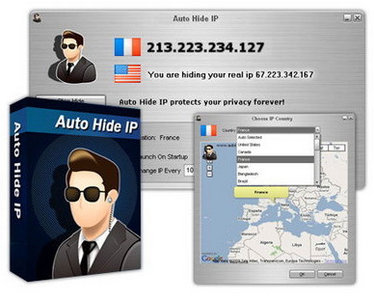
Auto Hide IP - Allows you to surf anonymously, change your IP address, and guard against hacker intrusions. Your IP address - your identity and can be used by hackers to break into your computer, steal personal information, or commit other crimes against you. Auto Hide IP allows you to surf anonymously, change your IP address, prevent identity theft, and guard against hacker intrusions, all with the click of a button.

Main features Auto Hide IP:
• Protects from any site that tries to "monitor" of your preferences or follow you on a unique IP address
• Avoids the use of your personal information to send spam and other debris
• Protects against hackers by hiding IP addresses, as well as information about the operating system
• Ability to frequently change IP addresses increases safety
• Enable and disable Hide IP as you wish in one click
• Allows you to bypass the limitation of the owners of some resources on users from certain countries or geographical regions
• Use with mail-service to send anonymous letters

DOWNLOAD
Read More..

Sabtu, 09 Juli 2011

Internet Download Manager 6.07 Final Multilingual |4.7 MB


Internet Download Manager has a smart download logic accelerator that features intelligent dynamic file segmentation and safe multipart downloading technology to accelerate your downloads. Unlike other download accelerators and managers that segment files before downloading starts, Internet Download Manager segments downloaded files dynamically during download process. Internet Download Manager reuses available connections without additional connect and login stages to achieve better acceleration performance. Internet Download Manager supports proxy servers, ftp and http protocols, firewalls, redirects, cookies, authorization, MP3 audio and MPEG video content processing. IDM integrates seamlessly into Microsoft Internet Explorer, Netscape, MSN Explorer, AOL, Opera, Mozilla, Mozilla Firefox, Mozilla Firebird, Avant Browser, MyIE2, and all other popular browsers to automatically handle your downloads. You can also drag and drop files, or use Internet Download Manager from command line. Internet Download Manager can dial your modem at the set time, download the files you want, then hang up or even shut down your computer when it's done.

Main Features:
• All popular browsers and applications are supported! Internet Download Manager has been tested with the following browsers: Internet Explorer, MSN Explorer, AOL, Netscape Communicator, Netscape 6, Netscape 7, Mozilla, Mozilla Firefox, Mozilla Firebird, Opera, NetCaptor, UltraBrowser, Slim Browser, Avant Browser, MyIE2, Optimal Desktop, Ace Explorer, Advanced Browser, 27 Tools-in-1 Wichio Browser, WindowSurfer, 550 Access Browser, FineBrowser Freeware, Kopassa Browser, Fast Browser Pro, Enigma Browser, GoSuRF, K-Meleon, Smart Explorer, The Off By One Web Browser, Smartalec Voyager, CrystalPort AppCapture, The Family Browser, XANA Web Browser, Bluto, AutoSurf, 32bit Web Browser, BrowseMan, WrestlingBrowser, Eminem Browser, UltraBrowser, Cygsoft LDAP Browser, and Net M@nager. Internet Download Manager supports all versions of popular browsers, and can be integrated into any 3rd party Internet applications.
• Easy downloading with one click. When you click on a download link in a browser, IDM will take over the download and accelerate it. IDM supports HTTP, FTP, HTTPS and MMS protocols.
• Download Speed Acceleration. Internet Download Manager can accelerate downloads by up to 5 times due to its intelligent dynamic file segmentation technology. Unlike other download managers and accelerators Internet Download Manager segments downloaded files dynamically during download process and reuses available connections without additional connect and login stages to achieve best acceleration performance.
• Download Resume. Internet Download Manager will resume unfinished download from the place where they left off.
• YouTube grabber. Internet Download Manager can grab FLV videos from popular sites like YouTube, MySpaceTV, and Google Video.
• Simple installation wizard. Quick and easy installation program will make necessary settings for you, and check your connection at the end to ensure trouble free installation of Internet Download Manager
• Drag and Drop. You may simply drag and drop links to IDM, and drag and drop downloaded files out of Internet Download Manager.
• Automatic Antivirus checking. Antivirus checking makes your downloads free from viruses and trojans.
• Advanced Browser Integration. When enabled, the feature can be used to catch any download from any application. None of download managers have this feature.
• Built-in Scheduler. Internet Download Manager can connect to the Internet at a set time, download the files you want, disconnect, or shut down your computer when it's done.
• IDM includes web site spider and grabber. IDM downloads all required files that are specified with filters from web sites, for example all pictures from a web site, or subsets of web sites, or complete web sites for offline browsing. It's possible to schedule multiple grabber projects to run them once at a specified time, stop them at a specified time, or run periodically to synchronize changes.
• IDM supports many types of proxy servers. For example, IDM works with Microsoft ISA, and FTP proxy servers.
• IDM supports main authentication protocols: Basic, Negotiate, NTLM, and Keberos. Thus IDM can access many Internet and proxy servers using login name and password.
• Download All feature. IDM can add all downloads linked to the current page. It's easy to download multiple files with this feature.
• Customizable Interface. You may choose the order, and what buttons and columns appear on the main IDM window.
• Download Categories. Internet Download Manager can be used to organize downloads automatically using defined download categories.
• Quick Update Feature. Quick update may check for new versions of IDM and update IDM once per week.
• Download limits. Progressive downloading with quotas feature. The feature is useful for connections that use some kind of fair access policy (or FAP) like Direcway, Direct PC, Hughes, etc.
• IDM is multilingual. IDM is translated to Albanian, Arabic, Azerbaijan, Bosnian, Bulgarian, Chinese, Croatian, Czech, Danish, Dutch, Farsi, French, German, Greek, Hebrew, Hungarian, Italian, Japanese, Korean, Lithuanian, Macedonian, Norwegian, Polish, Portuguese, Romanian, Russian, Serbian, Slovak, Slovenian, Spanish, Thai, Turkish, and Uzbek languages.

OS : Win XP/2000/Vista/Win 7
Language : Multilingual


DOWNLOAD LINK
Read More..

Anti-Banner Adguard 4.2.2 Build 1.0.3.47

Adguard is a powerful ads and popup blocking utility. Adguard works with all installed browsers and protects you against advertisements, speeds up pages loading and reduces bandwidth usage. In addition, Adguard includes effective antiphishing and antimalware filter.

Program name: Adguard
Version: 4.2.2
Release date: June 19, 2011
Bases: 1.0.3.47
Language: English
OS: Windows
File size: 1,3 Mb 


Key features of Adguard:
1. Saves time and nerves;
2. Works with all popular browsers;
3. Easy to use, works just out of the box, needs no tuning or customization;
4. Includes browser module;
5. Updated regularly;
6. Works on 32x and 64x OS versions.

Release notes for 4.2.2:

Optimized:
- Web pages loading speed
- Filters updating speed

New features of Adguard assistant:
- Can block almost any element selected on the webpage (in all modern browsers)
- Fixed some minor bugs
- Add new function: "Undo last added rule"


DOWNLOAD LINK

Read More..

Jumat, 27 Mei 2011

cFosSpeed 6.61 Build 1871 Beta

cFosSpeed is a network driver, which attaches itself to existing Internet connections. It then optimizes data transfer by means of Traffic Shaping. Traffic Shaping is a method for optimizing the Internet traffic. It allows maximum speed while ensuring minimal Ping. You can use cFosSpeed with a router and/or a DSL-modem or cable-modem. You can also use cFosSpeed with other types of Internet access, ie. whenever you already have an existing Internet connection. cFosSpeed supports a wide variety of connections, like DSL, cable, ISDN, UMTS, etc.

Legend:
* New feature
+ Improvement
! Software change requires modification of your configuration
x Bugfix
- Information only

OS: Windows XP / Vista / 7
Language: English
License: Trial Reset-box
Size: 5.19 Mb
not tested 
note: if you used the old version with crack by york, delete the crack before instal this.

DOWNLOAD LINK
pass: blacksharing

Read More..

Rabu, 25 Mei 2011

Real Hide IP 4.1.2.2

Use Real Hide IP to surf anonymously, prevent hackers from monitoring your online activities or identity thieves from stealing your identity and other personal information, send anonymous email, and un-ban yourself from forums or restricted websites. Protect your privacy on the Internet. With Real Hide IP, you can conceal your real IP address, surf anonymously, send anonymous emails through any web based mail system, un-ban yourself from forums or restricted websites, keeping your personal information safe from hackers and identity thieves. Real Hide IP enables you to be assigned one of our fake IP addresses which can be from different countries such as United States, United Kingdom, France, etc. It works with Internet Explorer, Firefox, Opera, Maxthon, MyIE and is compatible with all types of routers, firewalls, home networks, wireless networks and any other kind of Internet.

Key Features
* Hide Your Real IP Address
Be assigned fake IP addresses from different countries to conceal your real IP.
* Anonymous Web Surfing
Surf anonymously with fake IP, whenever you want to.
* Protect Your Identity Against Hackers
Protect you from hackers and identity thieves who will be tricked by your fake IP.
* Un-ban Yourself from Forums or Restricted Websites
Real Hide IP allows you to access any forums, blogs or websites that have ever banned you.
* Prevent Websites from Tracking Your Online Activities
Hide your real IP when you are surfing the Internet to prevent you from being tracked by websites.

* Platform
Windows 2000/XP/Vista/7 (32-bit and 64-bit)

Install Notes
1. Install Real Hide IP v4.1.2.2, and do not run.
2. Copy the crack "RealHideIP.exe" to prog dir,i.e."C:\Program Files\RealHideIP\", and overwrite the original.
3. DONE!

DOWNLOAD LINK
Read More..

Rabu, 18 Mei 2011

better Facebook

heh.. on this post i will share the tutorial to change theme from facebook and tools add-ons for firefox. but this theme can't view from another facebook account or your friends.

tutorial is simple. the instalation will be open when you ope your facebook.


download
Read More..

Senin, 09 Mei 2011

Google Earth Pro 6.02 full

all this time you may only use google earth with all its limitations compared to regular pro version. to get all the advantages a pro version then we should buy it, but now you do not need to buy because now I will share it for free to you ..
please try,,,,


DOWNLOAD
Read More..

Selasa, 03 Mei 2011

internet Download Manager 6.05 build 12 full

Internet Download Manager has a smart download logic accelerator that features intelligent dynamic file segmentation and safe multipart downloading technology to accelerate your downloads. Unlike other download accelerators and managers that segment files before downloading starts, Internet Download Manager segments downloaded files dynamically during download process. Internet Download Manager reuses available connections without additional connect and login stages to achieve better acceleration performance. Internet Download Manager supports proxy servers, ftp and http protocols, firewalls, redirects, cookies, authorization, MP3 audio and MPEG video content processing. IDM integrates seamlessly into Microsoft Internet Explorer, Netscape, MSN Explorer, AOL, Opera, Mozilla, Mozilla Firefox, Mozilla Firebird, Avant Browser, MyIE2, and all other popular browsers to automatically handle your downloads. You can also drag and drop files, or use Internet Download Manager from command line. Internet Download Manager can dial your modem at the fset time, download the files you want, then hang up or even shut down your computer when it's done.

pass: blacksharing
Read More..

Senin, 02 Mei 2011

cFosSpeed 6.50 FULL(no trial reset)

cFosSpeed - The Internet Accelerator
New version 6.50!

cFosSpeed increases your throughput and reduces your Ping.

Whenever you access the Internet with more than one data stream cFosSpeed can optimize the traffic.

  • Improve your Ping for online games
  •  Keep your internet fast during heavy upload/download
  • NEW: Improve mobile Internet
  • Reduce audio/video streaming problems
  • Improve VoIP speech quality
  • cFosSpeed prevents one application (e.g. sending email) from choking all others, like telephone calls, chat, etc.
  • cFosSpeed keeps your ping times low, so you can play online games and download files simultaneously.
  • All important data packets are automatically prioritized over unimportant ones. With the cFosSpeed program and protocol prioritization you can configure your applications ideally and/or add new Programs.
  • Real-time analysis of your data: With the new status window you can easily recognize which data streams you are currently transfering. 
  • cFosSpeed runs with DSL, Cable, WLAN, CDMA2000, UMTS, WCDMA, Modem, ISDN, broadband mobile (2G / 3G).
  • Here a detailed explanation of cFosSpeed's Traffic Shaping  

 DOWNLOAD FULL!!
Read More..