BlackSharing: picture

WELCOME!

PASSWORD IF NEED: blacksharing

Cari di sini

Tampilkan postingan dengan label picture. Tampilkan semua postingan

Kamis, 16 Februari 2012

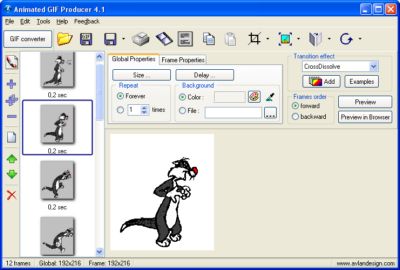
Avlan Design Animated GIF Producer 5.2


Avlan Design Animated GIF Producer 5.2 | 3 MB

Animated GIF Producer is a quick and remarkably easy-to-use tool for creating various animations, buttons and banners that will make your website shine. You no longer need to spend money on complex video processing platforms that will take you a couple of days to learn how to make a simple GIF animation. With Animated GIF Producer, there’s no complexity and GIFs can be created in a few minutes.

Key features:
- Support for AVI, MPG, MPE, MPEG video formats;
- A built-in snapshot capture facility;
- Support for BMP, JPEG, TIF, GIF, PNG, ICO, PCX, CUR and Windows Metafiles image formats;
- Import frames from other GIF;
- Resize frames (stretch);
- Multiple animation output settings;
- Define GIF-files global parameters: screen size, background color, delay;
- Define offset for each separate image;
- Set forward and backward images order;
- Apply transition effects for images;
- Import image from clipboard;
- Duplicate images;
- Reordering images;
- Save images of GIF-file as a set of common graphic formats;
- Export an AVI file; - Process the images and execute effects (for the current image or all images at once): crop, resample, rotate and flip images horizontally or vertically.

DOWNLOAD 
[Mediafire]
Read More..

Rabu, 08 Juni 2011

STOIK Stitch Creator v4.0.0.2822 Portable

STOIK Stitch Creator - Create Cross-Stitch Pattern from any Image or PhotoUsing STOIK Stitch Creator, you can convert photos into a cross stitch pattern. It will take just couple of minutes! Download our cross stitch pattern creator, install it, choose any of your picture, image or photo and get a cross stitch pattern and a color chart.

Cross-Stitch patterns may be changed by hand with tools like vitrual needle, color fill, eraser, text. You'll have access to preview on every step of your work, and finally you’ll be able to see final stitch patterns on screen and print.
STOIK Stitch Creator v4.0.0.2822  Portable | 8.6 MB


Cross-Stitching Made EasySTOIK Stitch Creator makes turning your pictures into cross-stitch masterpiece a breeze. You can convert any picture or photograph into a cross-stitch pattern, or create your very own cross-stitch charts from scratch by using tools like virtual needles, color fill, eraser, text and picture inserts.
Create Cross-Stitch Patterns in Three Easy StepsIt only takes three easy steps to convert a picture into a cross-stitch chart.

Choose your picture by loading it from the disk, scanner, or digital camera
Specify desired floss palette and let STOIK Stitch Creator convert your picture into an optimized cross-stitch pattern
Adjust your cross-stitch pattern by adding a motif, border, or using the drawing tools available. Hit Print and start stitching!

Better Conversion to Thread ColorsCreate cross-stitch charts in perfect color! STOIK Stitch Creator knows the colors of most threads, and has information from many recent brand catalogues. By specifying which threads you’re going to use, you can help STOIK Stitch Creator create a perfect pattern for you.

Image Conversion Wizard shows instant previews for every step
Various palette settings for cross-stitch patterns available with instant previews
Recognizes the most recent brand color catalogues such as Anchor, DMC, Madeira, J&P Coates
Brand Manager can update brand catalogues, define custom colors and custom brand palettes
Supports mixed-color threads

Powerful cross stitch Pattern Editing ToolsNot quite happy with busy background of your favourite photo? Want to add a theme or seasons greeting to your work? The many editing tools available will help you do that with ease.

Multiple layer support for creating complex stitches with reach color palette
A huge collection of themes and motifs
Extendable collection of *****ork style designs
A wide choice of borders
Text layer support for adding various text effects
Stitching styles: Over 10 stitch types including French Knot
Extra backstitch types including short and double backstitch

Creative Tools for Creating Cross Stitch PatternsSTOIK Stitch Creator is a embroidery pattern creation software packed with features allowing creating cross-stitch patterns from scratch, converting pictures into cross-stitch charts, editing and enhancing patterns. You can make also cross-stitch patterns and ornaments for kids.
The many creative tools allow drawing new cross-stitch patterns from scratch, enhancing and editing existing patterns. A full-scale image editor is included with STOIK Stitch Creator to allow drawing, editing and enhancing cross-stitch patterns with special effects. Basic cross-stitch pattern editing tools include:

Drawing tools: pen, line, ellipse, rectangle
Color Fill: selection, change thread
Selection: rectangle, ellipse, lasso, adding/subtracting selections


DOWNLOAD LINK
Read More..

Jumat, 20 Mei 2011

Photo Instrument 4.9.494 Full

this tool for a simpe design photo  with completely fiture and vits video tutorial for using, and i will share with serial key for get full version, because this product is trial.
PhotoInstrument is an easy to learn tool for editing and retouching digital photos.
The powerful raster graphics editor in PhotoInstruments quickly and easily allows you to adjust and process digital photos. PhotoInstruments rich tools and effects offer adjustments and photo retouching tools that are usually found only in expensive retouching software.

Now with just a few clicks in PhotoInstrument anyone can solve most digital photo problems. So easy to use that anyone can apply these changes. Included with PhotoInstrument is a short video tutorial that will teach you how to use PhotoInstrument in just minutes.

PhotoInstrument supports more than thirty image formats including PNG, JPG, BMP, TIF, PCX, TGA, EXR, ICO and Adobe Photoshop PSD.

PhotoInsturments user-friendly interface, supports these languages: Arabic, Azerbaijani, English, Bulgarian, Czech, Danish, Dutch, Farsi, French, German, Hebrew, Hungarian, Italian, Indonesian, Korean, Kurdish, Malay, Polish, Portuguese, Russian, Serbian, Slovak, Spanish, Simplified Chinese, Traditional Chinese, Turkish, Vietnamese


Here are some of the tools featured in PhotoInstrument:

· Liquify
· Clone
· Smudge
· Skin Cleaner
· Glamour Skin
· Dodge / Burn
· Brush
· Blur
· Sharpen
· Colorize
· Rotate / Scale
· Red Eye Removal
· Brightness-Contrast
· Adjust Color Levels
· Glow
· Healing Brush
· Denoise
· Crop
· Object Removal 


DOWNLOAD LINK

pass: blacksharing
Read More..

photo frame Editor 5.0.2 full

Frame Photo Editor is an easy to use photo editing software. You can add cool frames to your photos very quickly and easily. Resize, rotate, adjust color and add text to your pictures. Then you can mail to your friends or set as your desktop wallpaper. So, it can also enhance your desktop. Frame Photo editor makes you working with your digital photos as easy as possible!

With Frame Photo Editor, you can easily enhance your Photo Effects by blending your digital photos onto another image. The photo will be masked as special effect which you can select from a lot of masks that Frame Photo Editor provides. You can also easily add cool frame, pretty flowers and Cartoon clips onto your pictures. And you can insert text into pictures with speech frame. It makes your photo more interesting and attractive.

With it, you can easily bLend your digital photo onto another picture or photo. Apply Artistic Effects to your photos with Framing & Edging effects. You can also add flowers, cartoon pictures onto your pictures with it. Titles and captions are just as easy to add.

Makes your photo unique
With a few mouse clicks, you can generate an attractive picture with Frame Photo Editor. It provides a lot of items you could use in your pictures, such as flowers, cartoon pictures, frames. And we'll provide more in the future.
 
Download Link
Read More..